Service Mesh is the communication layer in your microservice setup. 请求代理layer
When you talk about “Service Mesh”, you will definitely hear the term “Sidecar”, a “Sidecar” is a proxy which is available for each instance of your service, each “Sidecar” takes care of one instance of one service.
以sidecar的方式来实现sevice mesh?统一的proxy做不到的话,由sidecar来实现?
What does a Service Mesh provide?
- Service Discovery
- Observability (metrics)
- Rate Limiting
- Circuit Breaking
- Traffic Shifting
- Load Balancing
- Authentication and Authorisation
- Distributed Tracing
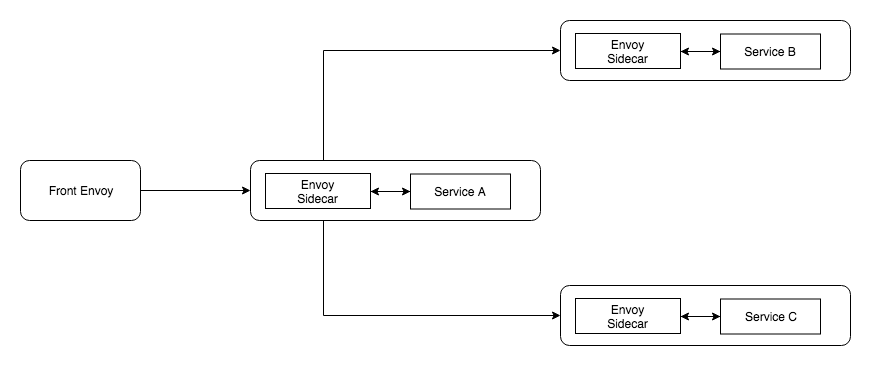
在pod和service部分进行改变
apiVersion: apps/v1beta1
kind: Deployment
metadata:
  name: servicea
spec:
  replicas: 2
  template:
    metadata:
      labels:
        app: servicea
    spec:
      containers:
        - name: servicea
          image: dnivra26/servicea:0.6
          ports:
            - containerPort: 8081
              name: svc-port
              protocol: TCP
        - name: envoy
          image: envoyproxy/envoy:latest
          ports:
            - containerPort: 9901
              protocol: TCP
              name: envoy-admin
            - containerPort: 8786
              protocol: TCP
              name: envoy-web
          volumeMounts:
            - name: envoy-config-volume
              mountPath: /etc/envoy-config/
          command: ["/usr/local/bin/envoy"]
          args:
            [
              "-c",
              "/etc/envoy-config/config.yaml",
              "--v2-config-only",
              "-l",
              "info",
              "--service-cluster",
              "servicea",
              "--service-node",
              "servicea",
              "--log-format",
              "[METADATA][%Y-%m-%d %T.%e][%t][%l][%n] %v",
            ]
      volumes:
        - name: envoy-config-volume
          configMap:
            name: sidecar-config
            items:
              - key: envoy-config
                path: config.yaml